

The less you know about your team's activities and which critical assets are causing downtime, the harder it is to improve your maintenance operations.
Reports give maintenance managers the data they need to build a more efficient and cost-effective maintenance team. Because when you use reporting strategically, you can tell compelling stories about what worked this month, which projects required the most time, and how your preventive maintenance plan cut down on costs.
We’ve outlined six computerized maintenance management system (CMMS) reports that will help you spot team bottlenecks and monitor assets.
The easiest way to extract these reports is from a maintenance management app like MaintainX. Once you've read more about reporting, you can try to build your own.
Key takeaways
- Use the “created vs. completed work orders” report to measure schedule compliance and identify team bandwidth issues.
- Analyze the “reactive vs. repeatable work orders” report to track your progress from a reactive to a proactive maintenance culture.
- Use the “time vs. cost” report to pinpoint resource-intensive assets and inform capital planning decisions.
- Monitor inspection reports for passed, flagged, or failed checks to identify trends and maintain a clear audit history for compliance.
- Use the “on-time vs. overdue” report to assess team efficiency and justify the need for additional resource allocation or training.


What is CMMS reporting?
A computerized maintenance management system (CMMS) report combines multiple maintenance metrics to give you a complete picture of your facility's performance.
The right reports let you track key performance indicators (KPIs), spot trends over time, and make smarter decisions that cut costs and reduce downtime. For example, effective CMMS reporting might show equipment downtime alongside repair costs to highlight which equipment is both unreliable and expensive to maintain.
By centralizing information on work orders, asset information, and inventory management, reports give you the visibility to manage your maintenance department proactively.
CMMS report #1: Created vs. completed work orders
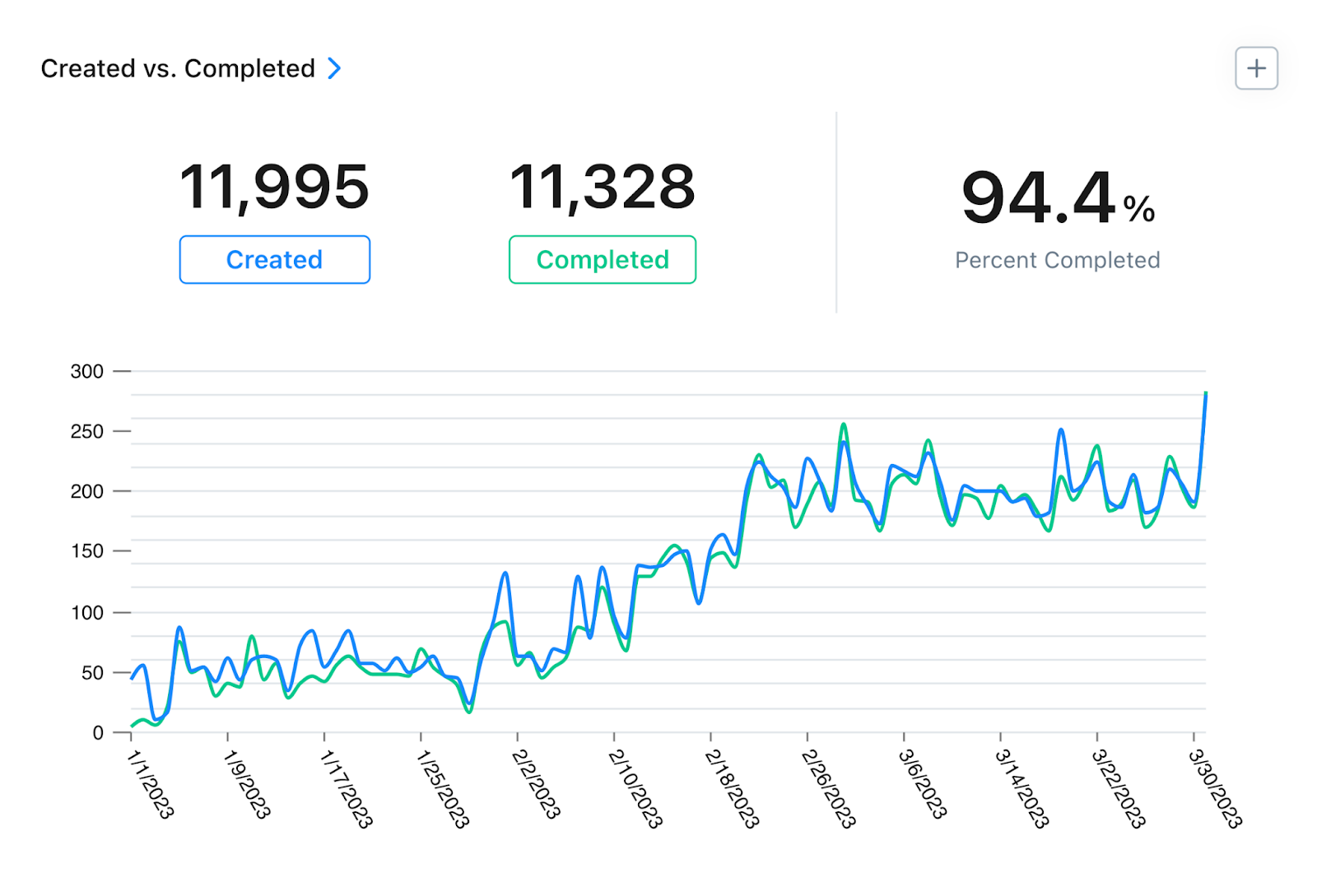
The Created vs. Completed report helps you assess schedule compliance, another way to monitor your team's performance and productivity.
Schedule compliance illustrates whether maintenance teams are completing preventive maintenance (PM) tasks as planned.
This KPI, which maintenance professionals also call PM compliance, compares actual work order completion dates to suggested completion dates. Tracking schedule compliance regularly gives you a clear picture of how productive your maintenance team really is.
CMMS report #2: Reactive vs. repeatable work orders, or planned maintenance percentage

The Repeatable vs. reactive KPI, also known as Planned Maintenance Percentage (PMP), measures whether your organization is stuck in a culture of reactive maintenance or is moving toward proactive maintenance.
PMP compares the amount of maintenance time your team puts toward planned maintenance tasks against the total amount of maintenance hours in a given time period (weeks, months, years).
Monitoring the repeatable to reactive ratio allows maintenance teams to better understand how their maintenance plans are working out. Maintenance best practices call for no more than 20% of work orders to be reactive; the Society for Maintenance & Reliability Professionals (SMRP) identifies the 80% planned threshold as the mark of a high-performing maintenance program.
If you have significantly more reactive than repeatable work orders, dive into the report and filter reactive work orders by asset. You'll likely spot which particular assets need preventive maintenance plans.
CMMS report #3: Time vs. cost
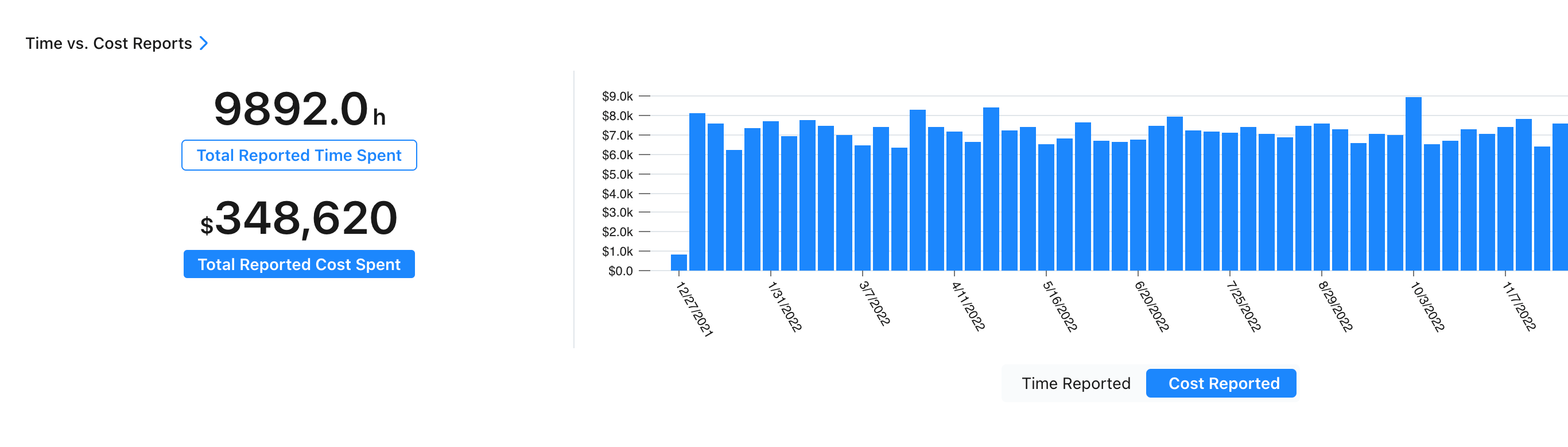
Time and Cost Tracking reports show you resource-intensive assets and reveal organizational bottlenecks.
These reports are crucial because advanced budgeting and capital decisions should integrate labor and inventory costs. With these statistics, you can make intelligent decisions about equipment, spending, and the cost of your employees versus the cost of outside technicians.
Tracking time and cost
With MaintainX reporting filters, you can track time and cost by:
- Due date
- Location
- Priority
- Vendor
- Part
- Asset
- Asset type
- Assigned to
- Procedure flags
- Requested by
- Status
- Category
With these filters, a Time and Cost Tracking report enables your team to track:
- Wrench, inspection, and work order time by team, user, asset, and location;
- The cost of wrench, inspection, and work order time by team, user, asset, and location; and
- Total work order cost, including parts, assets, labor, and any other costs that go into completing work orders.
CMMS report #4: Completed with inspection check work orders

This report identifies how many of your inspection checks passed, received flags, or failed in your chosen reporting period.
You can group the results by Asset to see which assets have an unusual number of failed or flagged inspection checks, then investigate those assets further to see if they have more serious problems that require attention.
Ultimately, this report helps your team identify inspection trends and the root causes of failures, downtime, and possible safety hazards.
CMMS report #5: On time vs. overdue work orders
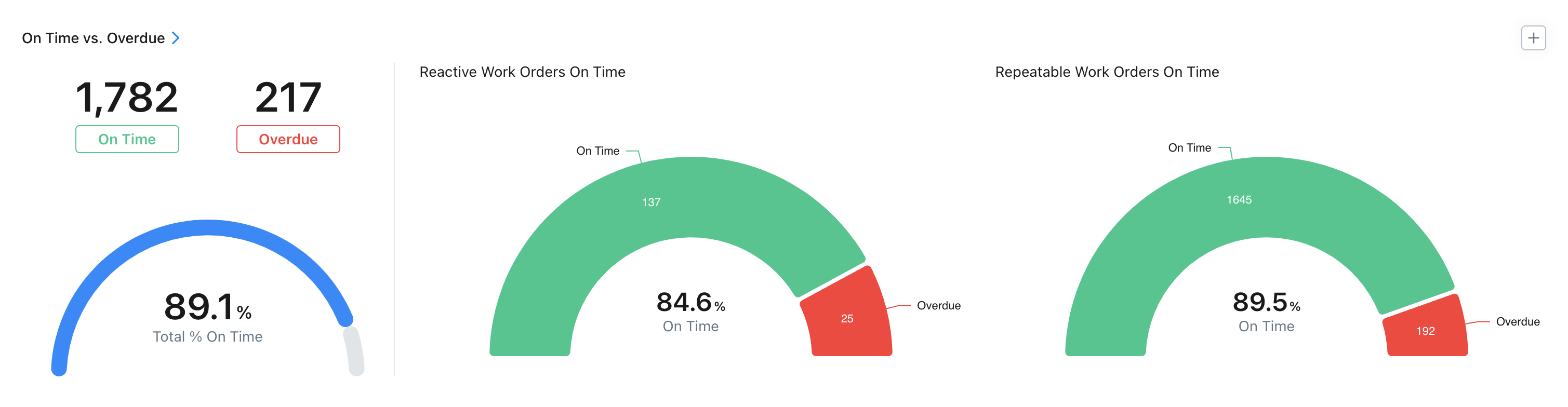
The On Time vs. Overdue report details which work orders were completed on time or were overdue, and also breaks them down into reactive vs. repeating.
This report shows when teams are meeting scheduled deadlines, giving you a clearer understanding of their bandwidth and efficiency. For example, is it always the same assets or teams that have overdue work orders? This data could help you justify additional headcount and evaluate the efficiency of equipment or the teams you assign.
CMMS report #6: Time to complete work orders
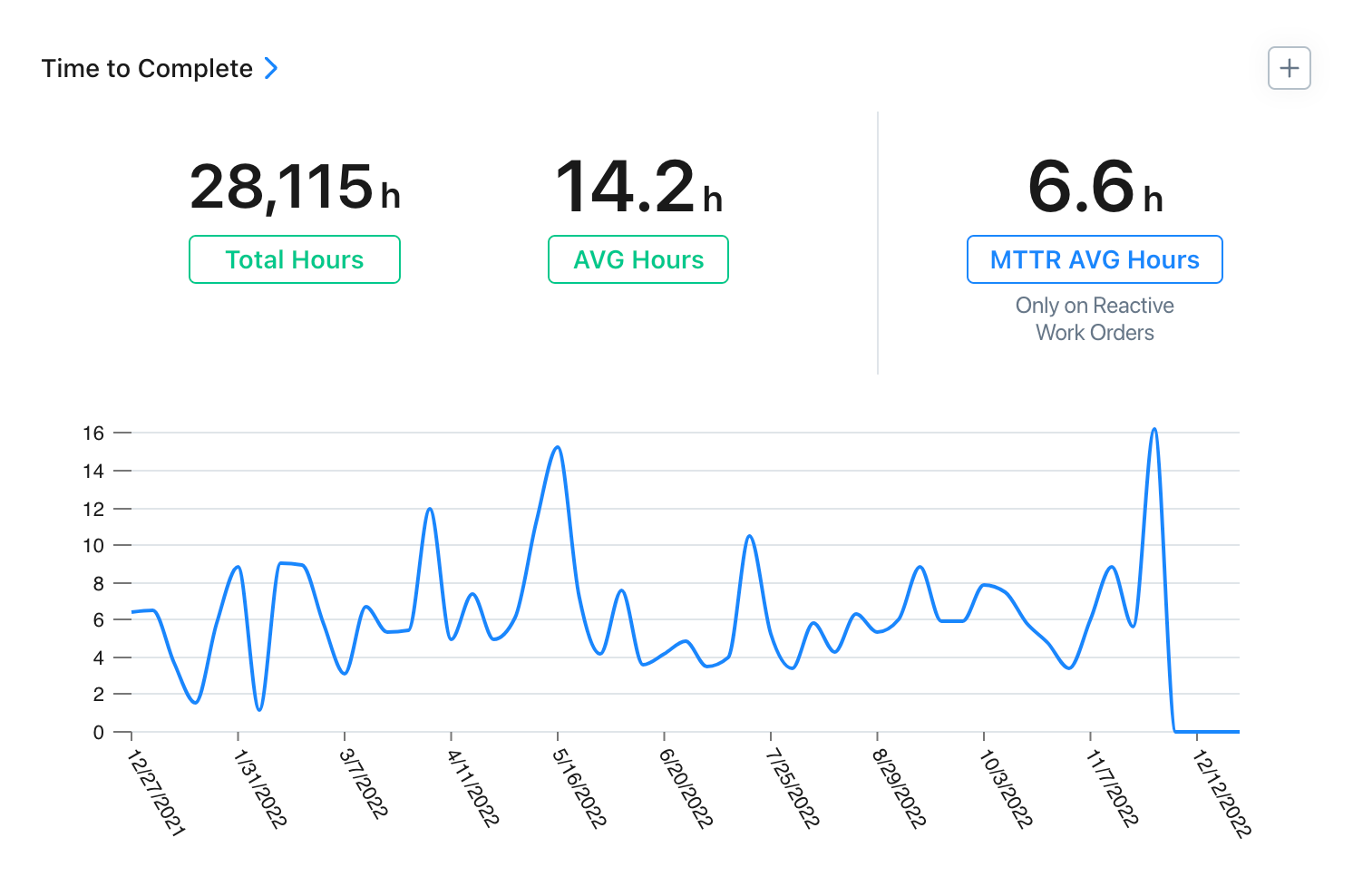
The Time to Complete report offers you a baseline for measuring asset efficiency and equipment value.
It shows how long it takes your team to complete work orders, displaying the total and average number of hours spent on reactive and repeatable work, and the mean time to repair (MTTR) on reactive work orders.
With Time to Complete, you can evaluate the quality and effectiveness of your maintenance procedures and mitigate extended repair times, technician overtime, outsourced contractor fees, and lost production time. Use this report to determine where to direct your attention (for example, maybe an asset needs an upgrade or a technician needs additional training).
Turn CMMS reporting into operational improvements
Real-time visibility into asset and team performance allows you to shift from reactive firefighting to a proactive maintenance strategy.
Ready to turn frontline data into cost savings? Sign up for free and start building reports that drive improvement across your facility.
CMMS reporting for maintenance teams FAQs
How often should maintenance managers pull CMMS reports in manufacturing and industrial facilities?
The ideal frequency depends on the report's purpose. Review operational reports (like “On-Time vs. Overdue Work Orders”) weekly or even daily to manage tasks. Strategic reports (such as “Time vs. Cost” by asset) typically provide more value when you analyze them monthly or quarterly to identify long-term trends and inform budget decisions.
What CMMS reporting features should maintenance managers look for when evaluating systems?
Look for features that make data accessible and actionable. Key capabilities include customizable dashboards to track your most important KPIs, automated report scheduling and delivery, filtering options to drill down into specific assets or teams, and mobile access so you can view performance data from anywhere.
How do maintenance teams ensure accurate data collection for reliable CMMS reporting?
Accurate reporting starts with quality data. Your team can ensure data integrity by using a mobile-first CMMS that makes it easy to log information in the field. Standardizing work order procedures with required fields, providing regular team training, and creating a culture of accountability are also critical steps.
What's the difference between CMMS reporting and traditional maintenance tracking methods?
CMMS reporting provides real-time, automated, and centralized data analysis. This is a significant improvement over traditional methods like spreadsheets or paper logs, which are often manual, delayed, and siloed. With a CMMS, your data is always current and accessible, allowing for proactive decision-making rather than reactive analysis of outdated information.
How can maintenance managers use CMMS reports to justify additional staffing or equipment investments?
CMMS reports provide the objective data maintenance managers need to build a strong business case. For example, you can use the “Time vs. Cost” report to prove that an aging asset's high repair expenses justify a capital investment in a replacement. Similarly, a consistently high number of overdue work orders in the “On-Time vs. Overdue” report demonstrates that your team is understaffed and requires additional headcount to meet demand.

Colin Strachan is Lead Product Marketing Manager at MaintainX, helping global enterprises advance their maintenance maturity through industrial IoT, AI, and connected operations. A former journalist with nearly a decade in SaaS marketing, he has spoken at smart manufacturing conferences and been published in leading industry outlets.


.webp)

.webp)